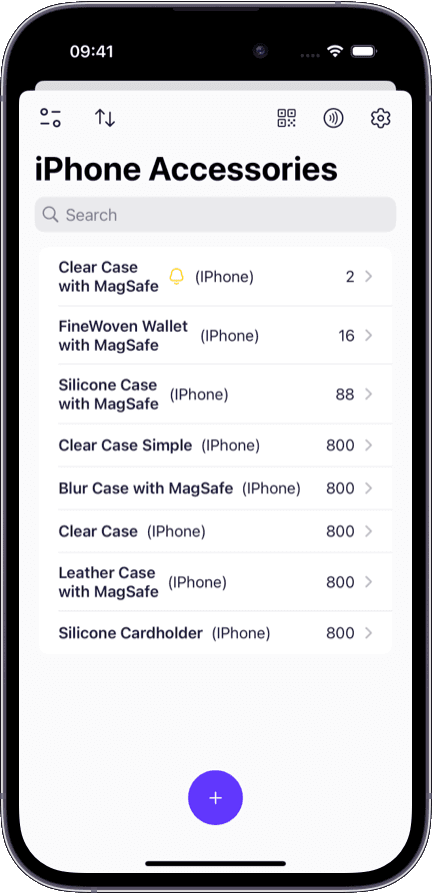
Warehouses and distribution centers
Track receiving, storage locations, and outgoing shipments with barcode-driven workflows.
With the right system, every item, location, and change is visible in one place:
A centralized product catalog with custom fields, photos, and barcode identifiers.
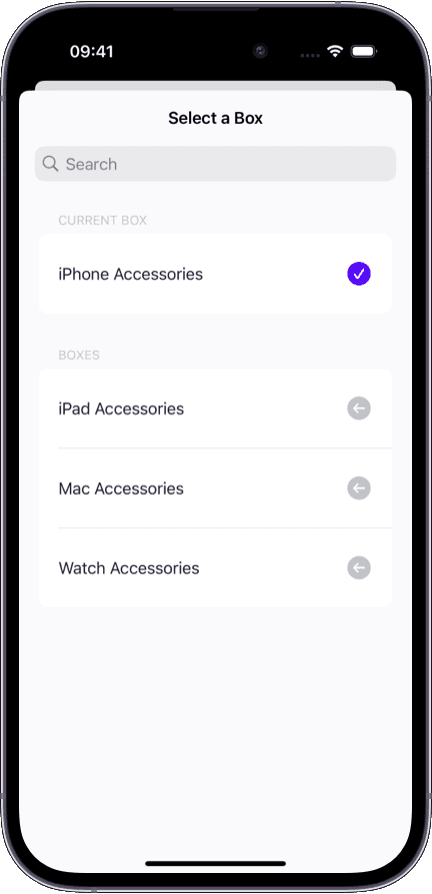
Multi-location hierarchy — warehouses, zones, shelves, and boxes — in a single view.
Real-time quantity tracking updated automatically after every scan, move, or count.
Role-based permissions so each team member sees only what they need.
Full audit history showing who changed what, when, and where.
Most teams hit the same walls once inventory outgrows a single spreadsheet:
Stock data is split across spreadsheets, emails, and chat threads with no single source of truth.
No one knows who changed a quantity or when, making audits unreliable.
Adding a new warehouse or storage room means duplicating files and manual merges.
Receiving and counting inventory takes too long without barcode scanning.
Team members see data they should not or cannot access data they need.
Teams across industries rely on inventory software to stay organized and reduce losses.
Track receiving, storage locations, and outgoing shipments with barcode-driven workflows.
Manage stock across a back room and sales floor, sync counts, and prevent stockouts.
Catalog equipment, supplies, and assets. Assign items to employees and track their lifecycle.
Keep materials, tools, and finished goods organized with photos and item-level notes.
With real-time tracking, every item has a visible location and a documented history:
Live item locations — see exactly where every item is, down to the shelf or box.
Movement trail — a complete record of every transfer between locations with timestamps.
Quantity change log — every increase, decrease, and adjustment recorded with context.
User attribution — every action tagged with the team member who performed it.
Instant search — find any item by name, barcode, or field instead of walking the floor.
Spreadsheets work until your team grows. Here is where dedicated software pulls ahead.
Flat rows with no structure, photos, or barcode links
Structured catalog with custom fields, photos, and barcode identifiers
Separate tabs or files per warehouse
Multi-level location hierarchy in one system
Manual entry, typos, and version conflicts
Barcode scanning on mobile with instant sync
Share the whole file or nothing
Role-based access per team member
No reliable change history
Timestamped log of every change with user attribution
Copy-paste between files
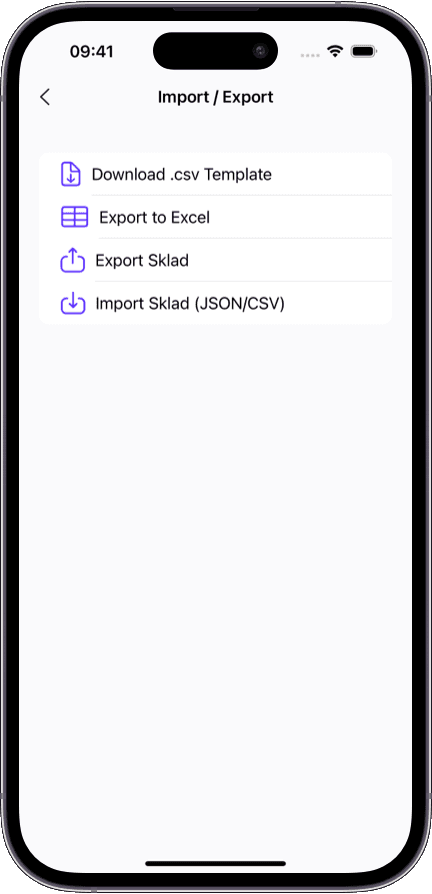
One-click CSV and Excel import and export
Sklad gives you the flexibility of a spreadsheet with the structure and reliability of a real inventory management system.
Every feature is designed to save time and reduce errors in daily inventory work.
Scan items with your phone camera to add, find, or update stock instantly. No dedicated hardware needed.
Create warehouses, rooms, shelves, and boxes. Move items between locations and track every transfer.
Attach photos to any item for visual identification. Reduce picking errors and speed up audits.
Invite team members with specific roles. Control who can view, edit, or manage inventory data.
Set minimum thresholds and get notified before items run out. Prevent stockouts before they happen.
Bring in existing inventory from CSV or Excel files. Export filtered reports for accounting, audits, or planning.
Set up in minutes — import your catalog and invite your team on day one.
Works on iPhone, iPad, and Mac with instant sync across all devices.
No enterprise pricing or setup fees — start free, upgrade when you need more.
Built for clarity: every screen is designed to answer 'what do we have and where is it?'
Running a smaller operation? Our small business inventory software guide covers the essentials for lean teams.
Looking for a free starting point? Sklad offers a generous free tier — learn more on our free inventory app page.
If you are evaluating alternatives, read our comparison of Sklad as a Sortly alternative for teams moving beyond basic inventory tools.
Inventory management software is a tool that helps teams catalog products, track quantities across locations, and maintain a record of every change. It replaces spreadsheets and manual processes with structured, real-time data that multiple team members can access simultaneously.
Spreadsheets lack structure, permissions, and audit trails. Inventory software gives you a product catalog with photos and barcodes, multi-location tracking, role-based access, and a timestamped history of every change — all synced in real time.
Yes. Sklad supports a multi-level location hierarchy. You can create warehouses, zones, shelves, and boxes, then move items between them while tracking every transfer in the audit log.
Yes. You can scan barcodes and QR codes using your iPhone or iPad camera. No dedicated scanning hardware is required. Scanning works for adding new items, finding existing ones, and updating quantities.
Yes. Sklad offers role-based permissions so you can invite team members with specific access levels. Warehouse staff, managers, and auditors each see only the data relevant to their role.
You can import your product catalog from CSV or Excel files. Map your columns to Sklad fields during import, and your items, quantities, and descriptions are ready to use immediately.
Yes. Every action — adding items, changing quantities, moving stock between locations — is recorded with a timestamp and the name of the user who made the change. This makes audits straightforward and disputes easy to resolve.
Sklad is available on iPhone, iPad, and Mac with real-time sync between devices. You can scan barcodes on mobile and review inventory on desktop — all data stays in sync.